6 checks before trusting a free host with your Discord bot
A free Discord bot that is always online is possible. But the conditions vary a lot from one host to another. Here are the verifiable criteria for comparing free plans before trusting them with your bot.
ACLClouds teamPublished on October 18, 2026Updated on November 17, 20266 min read
The essentials
A free plan usually has a trade-off: renewal, sleep mode or reduced resources.
Compare languages, memory, persistent files and the database.
Live logs and automatic restart prevent long outages.
The ACLClouds free plan runs 24/7, with no payment card and a manual renewal every 4 days.
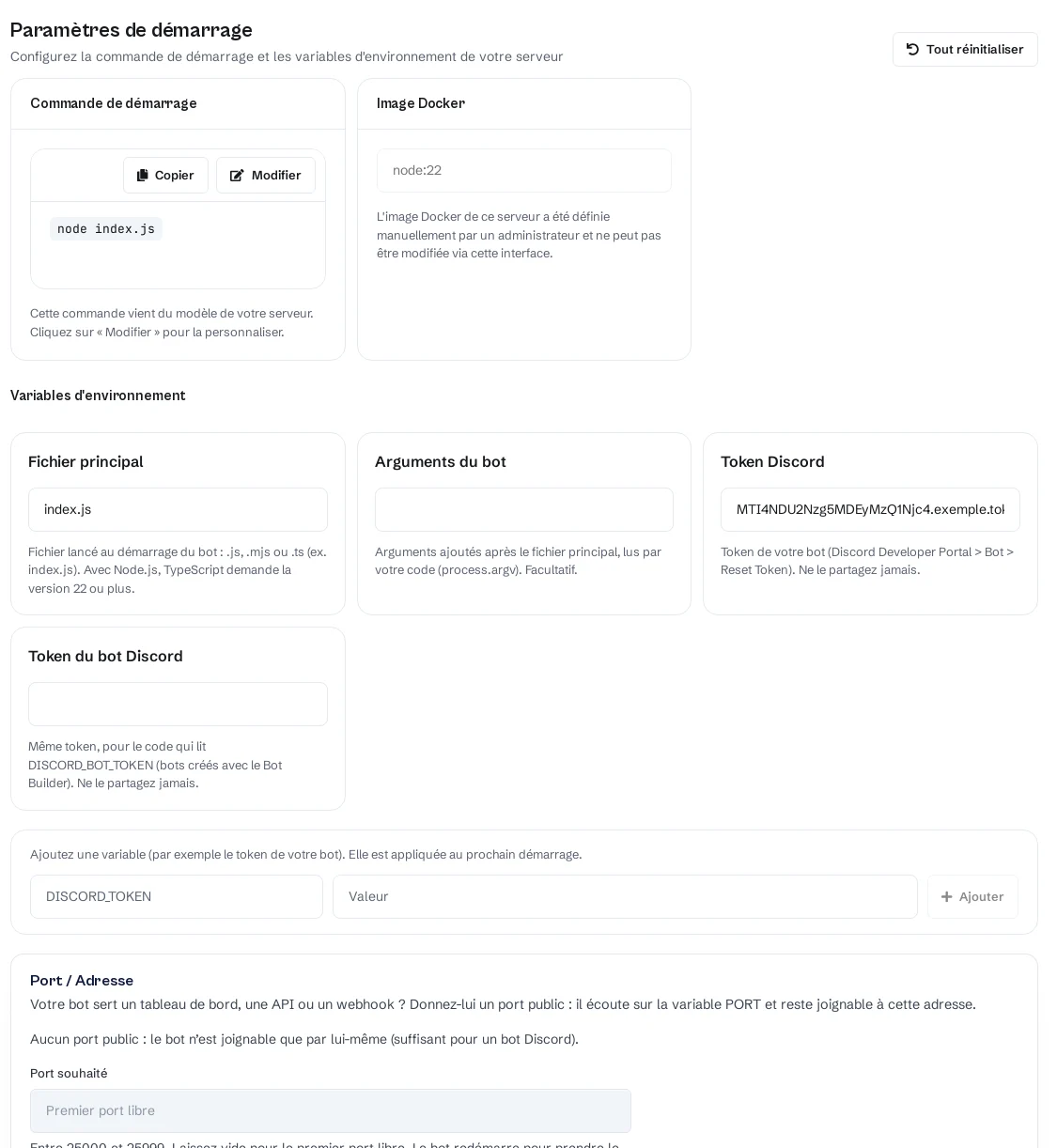
Startup settings and environment variables of a Node.js bot in the ACLClouds panel
Read the terms of the free plan
A free plan usually comes with a rule that limits its use: a renewal to perform, a sleep mode, an hour quota or reduced resources. Look for that rule before signing up: it decides whether your bot will really stay online.
Renewal: do you need to confirm the service, and how often?
Sleep mode: does the bot stay connected to Discord without activity?
Payment card: is it required at sign-up?
Your cookie choice
With your consent, we measure which ads bring us customers and how the site is used. Without it, nothing is measured and the site works exactly the same. You can change your mind at any time.Analytics and advertising, only with your consent. The site works the same without.
6 checks before trusting a free host with your Discord bot
·
Renewal, sleep mode, resources, languages, logs: what to check in a free plan before you deploy a Discord bot, and when a paid plan makes sense.
A free Discord bot that is always online is possible. But the conditions vary a lot from one host to another. Here are the verifiable criteria for comparing free plans before trusting them with your bot.
A free plan usually has a trade-off: renewal, sleep mode or reduced resources.
Compare languages, memory, persistent files and the database.
Live logs and automatic restart prevent long outages.
The ACLClouds free plan runs 24/7, with no payment card and a manual renewal every 4 days.
Read the terms of the free plan
A free plan usually comes with a rule that limits its use: a renewal to perform, a sleep mode, an hour quota or reduced resources. Look for that rule before signing up: it decides whether your bot will really stay online.
Renewal: do you need to confirm the service, and how often?
Sleep mode: does the bot stay connected to Discord without activity?
Payment card: is it required at sign-up?
Compare what the bot can actually do
Your bot’s language must be supported as is, without workarounds. Then look at the available memory and CPU, whether files are kept between restarts and whether you can add a database. A small moderation bot and a music bot do not have the same needs.
Available runtimes: Node.js, Python, Bun or others, depending on your code.
Persistent files: does your data survive a restart?
Database: included, optional or missing?
Check the operating tools
Sooner or later, a bot stops: a dependency, a revoked token, an unhandled error. What matters then is live logs to understand, an automatic restart to come back online and a safe place to store the token. To go further on uptime, read our guide to keeping a Discord bot online without downtime.
Live logs viewable from the browser.
Automatic restart after an unexpected stop.
Private variables for the token, outside the source code.
The ACLClouds free plan, in plain terms
Our free Discord bot hosting runs 24/7, with no payment card. The trade-off is simple: a free manual renewal every 4 days. The free plan runs Node.js and Python bots, with a console, live logs, files kept between restarts and automatic restart. Bun, C#, Go, Java, Rust and Lua are available on the paid plans.
Free, no payment card, online 24/7.
Free manual renewal every 4 days, from the panel.
DDoS protection, console and logs included.
When to move to a paid plan
The free plan suits tests, personal bots and small communities. A paid plan becomes useful when the bot needs more memory or CPU, a database or more storage. It also removes the manual renewal, without changing the panel or the deployment tools.
More RAM and CPU for a growing bot.
Database and backups included in paid plans.
Same panel and same runtimes as the free plan.
Why choose ACLClouds for your bot
The Free plan's limits are public: 1 bot, 315 MB of RAM, 0.25 vCPU and 715 MB of storage, with no sleep mode. The free renewal is done from the bot's page, during the 2 days before the due date or after a suspension. To get started step by step, follow the Python and Node.js tutorial.
SFTP access for each bot (port 2222), free plan included.
ffmpeg, yt-dlp and deno preinstalled in the Node.js and Python environments.
A card in the console to paste the bot token and restart the bot.
If something breaks, the Discord bot offline guide helps you read the error.
Frequently asked questions
Do I need a payment card for the free plan?
No. The free plan is created without a payment card. Only paid plans go through a payment.
How often must the free plan be renewed?
Every 4 days, manually and free of charge from the panel. The next expiry date is shown on the service card.
Which languages are supported?
Node.js, Bun, Python, C#, Go, Java, Rust and Lua environments are available on the paid plans, with MariaDB for projects that need a database. The free plan runs Node.js and Python bots.
What is the difference between the free plan and paid plans?
Paid plans add memory, CPU, storage, a database and backups, and do not require a manual renewal every 4 days.